

Stop Loss and Take Profit Orders
Introduction
Effective risk management is crucial for successful trading. Webull has made ‘Stop Loss and Take Profit’ order types available for both ASX and US Trading now with the aims to empower traders to automate their trading strategies and protect their investments.
In this article, we explain what these orders are, how they work on the Webull app, and provide some practical use cases.
What Are Stop Loss and Take Profit Orders?
A Take Profit/Stop Loss Order is an instruction that submits a limit order (for take profit) and a stop order (for stop loss) once the primary order is filled. When one order is partially or fully filled the other is automatically cancelled.
Stop Loss Order: A stop loss order is designed to protect an investor's loss on a position. It enters a market order to sell the security when its price falls to a predetermined level, aiming to prevent further losses.
Take Profit Order: A take profit order is a type of limit order that automatically enters a limit order to sell the security when its price rises above a specified level, aiming to secure profits before the market can reverse.
Stop Loss and Take Profit Orders are considered as Advanced Orders. They may have increased risks due to their reliance on trigger processing, market data, and other system factors.
Stop prices are not guaranteed execution prices. While a client may receive a prompt execution of a stop order that becomes a market order, during volatile market conditions, the execution may be at a significantly different price from the stop price if the market is moving rapidly.
By using advanced orders, you agree that Webull is not responsible for losses or damages resulting from market data problems, system issues, and user misuse among other factors.
How They Work on the Webull App
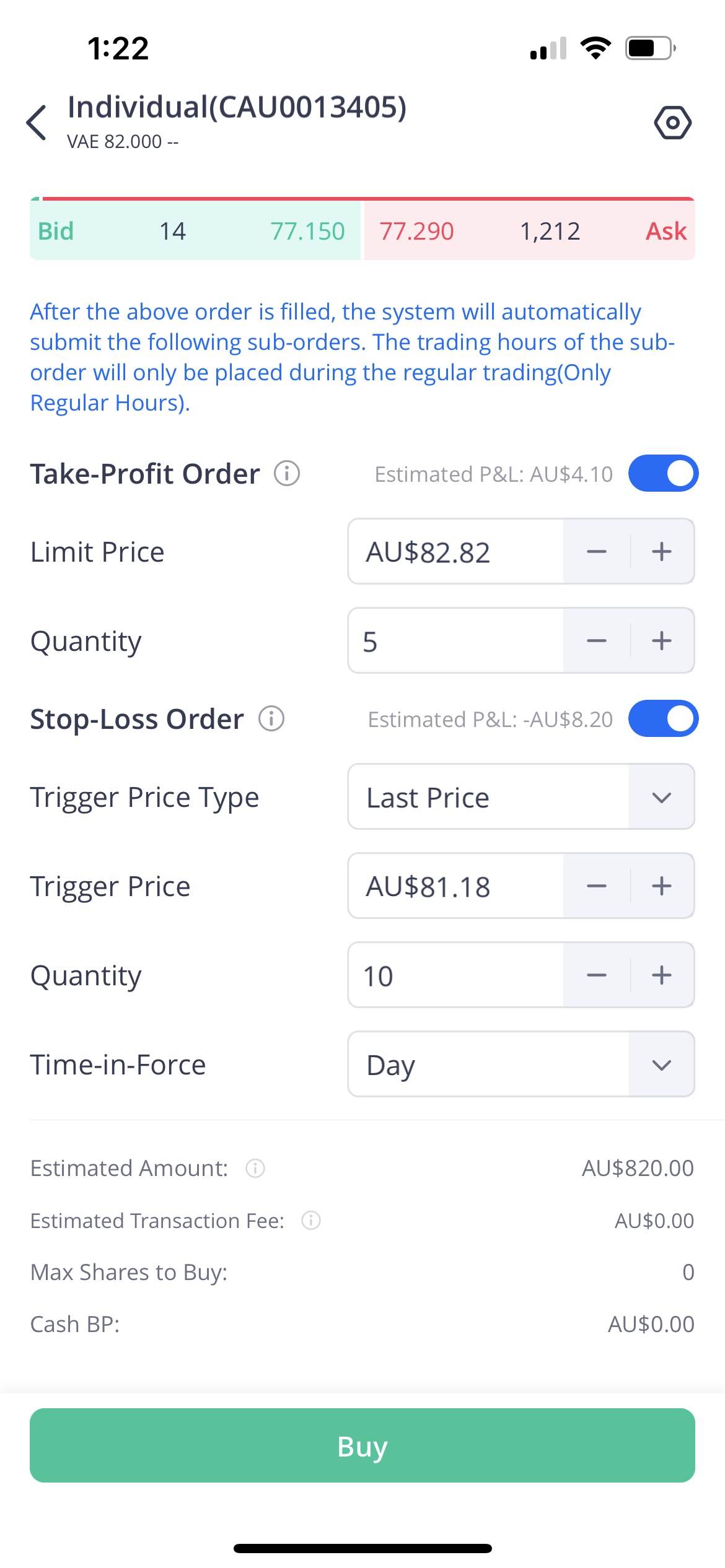
Setting up Stop Loss and Take Profit orders on the Webull app is straightforward. Here’s a step-by-step guide:
- Open the Webull App: Navigate to the stock or option you want to trade.
- Select the Trade Button: Tap on the trade button to open the order screen.
- Choose Order Type: Change the order type to "Limit + Take Profit/Stop Loss Order" or “Market + Take Profit/Stop Loss” depending on your initial order type preference.
- Set Limit Price: Specify the limit price for your opening order (if selects Limit + Take Profit/Stop Loss Order).
- Set Take Profit Price: Enter he price at which you want to take profit.
- Set Stop Loss Price: Enter the price at which you want to stop loss.
- Set Volume: Fill in the order quantity for each order.
- Confirm and Place Order: Review your order details and place the order. You can use the toggle on the right to set only Take Profit or Stop Loss order.

Use Cases
Scenario 1: Protecting Against Losses Imagine you bought shares of a tech company at $100 each. To protect your investment, you set a stop loss order at $90. If the stock price drops to $90, the stop loss order will trigger, automatically creating a sell order of your shares to prevent further losses.
Scenario 2: Securing Profits Suppose you bought shares of a renewable energy company at $50 each. You set a take profit order at $70. If the stock price rises to $70, the take profit order will execute, selling your shares and locking in your gains.
Scenario 3: Combining Both Orders You purchase shares of a pharmaceutical company at $200 each. You set a stop loss order at $180 to limit potential losses and a take profit order at $250 to secure profits. This strategy ensures you manage risk while simultaneously locking in a favourable return.

Conclusion
Stop Loss and Take Profit orders are tools for managing risk and automating your trading strategy. By using these features on the Webull app, you can protect your investments and make informed trading decisions. Whether you're a novice or an experienced trader, incorporating these orders into your trading plan can enhance your overall strategy and help you achieve your financial goals.